

PrimeFacesを止めたらページング機能がないので自作した話
はじめに
『PrimeFaces』を利用しない(していない)経緯については『PrimeFacesについて』を参照してください。 さて、PrimeFacesを利用しない事で困る事とは何でしょう。
それは『ページング機能』です! タグで言う所の『dataTable』となり、PrimeFacesを使用すると驚くほど簡単に『ページング機能』を実装する事が可能でした。 ただし、Jakartaフレームワークには標準で『ページング機能』はありません。
これまで全て『PrimeFaces』の恩恵を享受していたのです。 しかし大量のデータ一覧表を作成する場合『ページング機能』は必須と言える機能となります。 ですので、PrimeFacesを利用しない場合は当然『自作するしかありません!』 ページングの自作ってハードル高そうですが、実はそうでもなかったりします。
これから順を追って解説していきますが、全てを読み終わった時に感じるのはもしかしたら、 『一番のハードルはスタイルシートじゃね!?』となっているかもです。
環境構築
※自前のテーブルを使用したい場合は適宜読替えてください
CREATE TABLE IF NOT EXISTS products (
id INT AUTO_INCREMENT COMMENT '商品ID',
product_code CHAR(3) NOT NULL COMMENT '商品コード)',
product_label VARCHAR(255) NOT NULL COMMENT '商品ラベル)',
product_name VARCHAR(255) NOT NULL COMMENT '商品名',
factory VARCHAR(255) NOT NULL COMMENT '製造工場',
del_flg CHAR(1) NOT NULL COMMENT '削除フラグ)',
PRIMARY KEY (id)
) ENGINE=InnoDB DEFAULT CHARSET=utf8mb4 COMMENT='商品情報';
JPAプロジェクトの場合は『こちらを参考(エンティティ作成)』にして作成しましょう。 エンティティが作成できたら『DAO』を作成します。
package dao;
import java.io.Serializable;
import java.util.List;
import entity.Product;
import jakarta.enterprise.context.Dependent;
import jakarta.persistence.EntityManager;
import jakarta.persistence.PersistenceContext;
@Dependent
public class ProductDao implements Serializable {
private static final long serialVersionUID = 1L;
@PersistenceContext(unitName = "myMysqlUnit")
protected EntityManager em;
@SuppressWarnings("unchecked")
public List<Product> findProductAll() {
final String sql = "SELECT * FROM products WHERE del_flg <> '1'";
return em.createNativeQuery(sql, Product.class).getResultList();
}
}
package view;
import java.util.List;
import dao.ProductDao;
import entity.Product;
import jakarta.faces.view.ViewScoped;
import jakarta.inject.Inject;
import jakarta.inject.Named;
@Named
@ViewScoped
public class SampleBean extends BaseBean {
private static final long serialVersionUID = 1L;
@Inject
private ProductDao dao;
private List<Product> list;
@Override
protected void initialize() {
list = dao.findProductAll();
System.out.println("----- " + list.get(0).getProductName() + " -----");
}
}
package view;
import java.io.Serializable;
import annotation.UserAgentChecked;
public abstract class BaseBean implements Serializable {
private static final long serialVersionUID = 1L;
protected boolean isFirstTiem = false;
protected static final String SELF = null;
@UserAgentChecked
public void init() {
if (isFirstTiem) {
return;
}
// 子がオーバーライドする
initialize();
// ライフサイクル中は初期化しない
isFirstTiem = true;
}
// 子の初期化メソッド定義
protected abstract void initialize();
public boolean isFirstTiem() {
return isFirstTiem;
}
}
コンストラクタの仕組みを目的に作成したクラスとなります。
詳細は『こちら』を参照してください。
<!DOCTYPE html>
<html xmlns="http://www.w3.org/1999/xhtml"
xmlns:h="jakarta.faces.html"
xmlns:f="jakarta.faces.core"
xmlns:p="jakarta.faces.passthrough">
<f:metadata>
<f:event type="preRenderView" listener="#{sampleBean.init}" />
</f:metadata>
<h:head>
<title>Hello World</title>
</h:head>
<h:body>
<h1>おはよう世界!</h1>
<h:form id="index_form" prependId="false" >
</h:form>
</h:body>
</html>
http://localhost:8080/{プロジェクト名}/sample.xhtml 特に画面は無意味ですが、エクリプスのコンソールに『----- 商品名_001 -----』と出力されていれば正常です。 以降の章からは、これらのソースを拡張する形で『ページング』機能を解説していきます。
ディープコピー
今回のテーマとは少し脱線しますが、サンプルとして気持ちが悪いです。
よって『Record class』を使用したディープコピーも紹介します。 まずはお約束の『DTO』を作成します。
エンティティ名が『Product』ですので『ProductDto.java』とします。
package dto;
import entity.Product;
public record ProductDto(
// マッピング用プロパティ定義
int id,
String productCode,
String productLabel,
String productName,
String factory,
String delFlg
) {
// エンティティからDTOへのディープコピー用静的ファクトリメソッド
public static ProductDto fromEntity(Product ent) {
if (ent == null) return null;
return new ProductDto(
ent.getId(),
ent.getProductCode(),
ent.getProductLabel(),
ent.getProductName(),
ent.getFactory(),
ent.getDelFlg()
);
}
}
簡単に解説します。
※ 因みにちゃんと『ビーンバリデーション』の設定もできます ② メソッド『fromEntity』に引数としてエンティティを渡す事でディープコピーが処理されます。 ③ 返却するDTOの引数の順番は、宣言した順番と合わせる事でマッピングされます。
package view;
import java.util.List;
import dao.ProductDao;
import dto.ProductDto;
import entity.Product;
import jakarta.faces.view.ViewScoped;
import jakarta.inject.Inject;
import jakarta.inject.Named;
import lombok.Getter;
@Named
@ViewScoped
public class SampleBean extends BaseBean {
private static final long serialVersionUID = 1L;
@Inject
private ProductDao dao;
@Getter
private List<ProductDto> dtoList;
@Override
protected void initialize() {
List<Product> list = dao.findProductAll();
// DTOにディープコピー
this.dtoList = list.stream().map(ProductDto::fromEntity).toList();
System.out.println("----- " + this.dtoList.get(0).productName() + " -----");
}
}
DTOからの値の参照方法に注目して下さい。
『this.dtoList.get(0).productName()』
これはレコードクラスの特徴で、コンパイル時に自動的に『public String productName()』メソッドを作成するためです。
※ レコードクラスには『セッター(setter)』は無いので注意してください 因みに、サンプルでは『List<ProductDto>』型をディープコピーしていますが、単純に『ProductDto』にコピーするには以下の様にします。
this.dto = dto.fromEntity(entity);
『dataTable』作成
まずは単純に『dataTable』の実装となります。
<!DOCTYPE html>
<html xmlns="http://www.w3.org/1999/xhtml"
xmlns:h="jakarta.faces.html"
xmlns:f="jakarta.faces.core"
xmlns:p="jakarta.faces.passthrough">
<f:metadata>
<f:event type="preRenderView" listener="#{sampleBean.init}" />
</f:metadata>
<h:head>
<title>Hello World</title>
</h:head>
<h:body>
<h1>おはよう世界!</h1>
<h:form id="index_form" prependId="false" >
<h:dataTable value="#{sampleBean.dtoList}" var="product" binding="#{myTable}" border="1">
<h:column>
<f:facet name="header">行数</f:facet>
#{myTable.rowIndex + 1}
</h:column>
<h:column>
<f:facet name="header">ID</f:facet>
#{product.id()}
</h:column>
<h:column>
<f:facet name="header">商品コード</f:facet>
#{product.productCode()}
</h:column>
<h:column>
<f:facet name="header">ラベル</f:facet>
#{product.productLabel()}
</h:column>
<h:column>
<f:facet name="header">商品名</f:facet>
#{product.productName()}
</h:column>
<h:column>
<f:facet name="header">製造工場</f:facet>
#{product.factory()}
</h:column>
<h:column>
<f:facet name="header">削除状態</f:facet>
#{product.delFlg()}
</h:column>
</h:dataTable>
</h:form>
</h:body>
</html>
少し捕捉すると、全件と言いつつデータは《99件》しかありません。
項目《行数》は99件とありますが、項目《ID》は100件となっていますね。
これはデータ投入時に1件だけ《削除フラグ = 1》を入れた事で、そもそもDB取得自体が99件だったためです。
『dataTable』の属性《binding》に任意の名前『#{myTable}』などを指定すると『#{myTable.rowIndex}』で「0」が取得できます。
これは、このテーブル自体の連番となります。
その属性とは『first』『rows』です。 名前でピンとくるかもしれませんが、その通りです。
【first】ゼロを先頭に何番目から表示するかの設定
【rows】 表の行数を設定 つまり『first』の値を動的にする事でページングが実現できます。 試しに『dataTable』を以下の様に修正し、更にボタンを追加してみてください。 <h:dataTable value="#{sampleBean.dtoList}" var="product" binding="#{myTable}" border="1" first="#{sampleBean.pageStart}" rows="10">
<h:commandButton id="next" value="次へ" action="#{sampleBean.next()}" /> 追加したプロパティ、メソッドをバッキングビーン側に設定します。
@Getter
private int pageStart = 0;
~ 省略 ~
public void next() {
pageStart += 10;
}
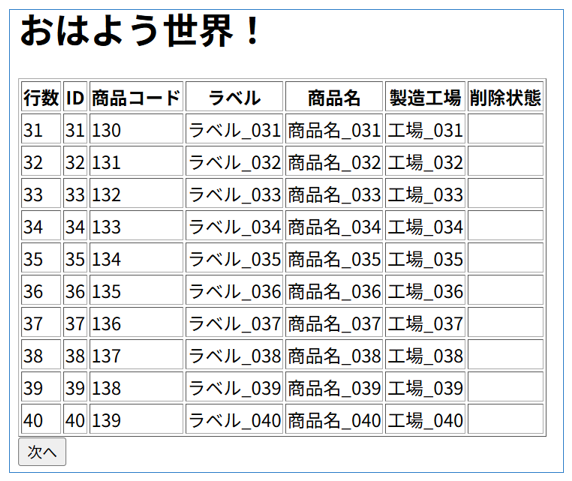 上記画像の通り『次へ』ボタンを押下するとページ送りができます。
やったぁ~~~! 『...って、そうじゃないだろっ!!』 そんな声が聞こえてきそうです。
そうです、これページングしてる様には見えますが、実際は全件読み込んでいます。
例えば100万件あるデータを10件単位で表示する一覧画面があるとします。 まず最初の画面を表示する為に、100万件の情報をDBから取得して『DTO』に格納します。
そして『たった10件表示』の為に、その膨大なDTO情報をページ送りの度に引きずり回すのです。 これコードレビューか、パフォーマンステストで指摘されますよ。 最悪メモリエラーになるかもしれませんね。
ページング実装
② ページ送り機能がある([最初へ][前へ][次へ][最後へ])
③ 全体のページ数と、現在のページ数が確認できる
⑤ JPAを使用している場合は、事故を防ぐため『DTO』へディープコピーしたい。
⑥ 表示されてるデータしかメモリに読込みたくない
パッケージは何処でも良いですが、ページングは画面専用となるため『view/paginator』とします。
package view.paginator;
import java.io.Serializable;
import java.util.List;
import java.util.function.BiFunction;
import java.util.function.Supplier;
public class Paginator<T> implements Serializable {
private static final long serialVersionUID = 1L;
private String localPageSize;
private long first = 0;
private int pageSize = 10;
private Long totalCount;
private List<T> items;
// データ取得処理(関数型インターフェース)を保持
private final BiFunction<Long, Integer, List<T>> dataFetcher;
private final Supplier<Long> countFetcher;
public Paginator(int pageSize, BiFunction<Long, Integer, List<T>> dataFetcher, Supplier<Long> countFetcher) {
this.pageSize = pageSize;
this.dataFetcher = dataFetcher;
this.countFetcher = countFetcher;
}
// 画面側からこのメソッドを呼び出す事でデータ取得できる
public List<T> getItems() {
if (items == null) {
reload();
}
return items;
}
// 1画面の行数変更(及びDBの最新状態を再取得する)
public void reload() {
this.totalCount = countFetcher.get();
this.items = dataFetcher.apply(first, pageSize);
}
// ページ操作アクション「次へ」
public void next() {
if (first + pageSize < totalCount) {
first += pageSize;
reload();
}
}
// ページ操作アクション「前へ」
public void first() {
if (first - pageSize >= 0) {
first = 0;
reload();
}
}
// ページ操作アクション「前へ」
public void prev() {
if (first - pageSize >= 0) {
first -= pageSize;
reload();
}
}
// ページ操作アクション「最終へ」
public void last() {
if (first + pageSize < totalCount) {
this.first = (totalCount - 1) / pageSize * pageSize;
reload();
}
}
// 画面表示用のヘルパーメソッド
public int getCurrentPage() { return (int) ((first / pageSize) + 1); }
public int getTotalPages() { return (int) Math.ceil((double) totalCount / pageSize); }
// ページ操作アクション「前へ」「次へ」ボタンの表示可否
public boolean isHasPrev() { return first > 0; }
public boolean isHasNext() { return first + pageSize < totalCount; }
// ゲッター
public long getFirst() { return first; }
public int getPageSize() { return pageSize; }
public Long getTotalCount() { return totalCount; }
// ローカル制御用
public String getLocalPageSize() {return this.localPageSize;}
public void setLocalPageSize(String local_page_size) {this.localPageSize = local_page_size;}
public void setPageSizeLocal() {
this.pageSize = Integer.parseInt(this.localPageSize);
this.first = 0;
this.reload();
}
// ページサイズ切替え制御用
public void changePageSizeLocal() {
this.pageSize = Integer.parseInt(this.localPageSize);
this.first = 0;
this.reload();
}
}
《プロパティ》
バッキングビーン側で設定する、デフォルトの一覧表データ数を設定 ・first
表示位置([SQL]の「offset」に対応) ・pageSize
画面単位の表示行数([SQL]の「limit」に対応) ・totalCount
ページ全体の行数 ・items
現在ページのページ情報を参照 ・dataFetcher
内部処理で使用(気にしなくて良い) ・countFetcher
内部処理で使用(気にしなくて良い)
ビューがこのメソッドを参照する事で対象ページ情報を表示します ・public void reload()
DBの最新状態を再取得します ・public void next()
ページを1つ進めます ・public void first()
ページを先頭に戻します ・public void prev()
ページを1つ戻します ・public void last()
ページを最後まで進めます ・各種ヘルパーメソッド(気にしなくて良い)
・public int getTotalPages()
・public boolean isHasPrev()
・public boolean isHasNext()
・public long getFirst()
・public int getPageSize()
・public Long getTotalCount()
・public void setLocalPageSize
・public void changePageSizeLocal()
コンストラクタがかなり複雑になっていますが、設定する内容自体は単純です。
① int pageSize
画面における一覧表のデータ数となります。
② BiFunction<Long, Integer, List<T>> dataFetcher
ここが複雑ですが、SQLで言う『offset』『limit』定義となり、実際のデータ型となります。
③ Supplier<Long> countFetcher
データ総数となります。
1度初期化すればバッキングビーンでの特別な処理は不要となります。
分かりやすい様に、新たなメソッド『findProduct』を作成します。
更に全体の取得件数も必要なため、新たなメソッド『countAll』も作成します。
// 「LIMIT」「OFFSET」句を考慮したメソッド作成
@SuppressWarnings("unchecked")
public List<Product> findProduct(long offset, long limit) {
final String sql = "SELECT * FROM products WHERE del_flg <> '1' limit :limit offset :offset ";
return em.createNativeQuery(sql, Product.class)
.setParameter("limit", limit)
.setParameter("offset", offset).getResultList();
}
// 取得件数を返却する
public Long countAll() {
final String sql = "SELECT * FROM products WHERE del_flg <> '1'";
return (long) em.createNativeQuery(sql, Product.class).getResultList().size();
}
次はいよいよこの2つの機能を使って『ページングインスタンス』を作成します。
package view;
import dao.ProductDao;
import entity.Product;
import jakarta.faces.view.ViewScoped;
import jakarta.inject.Inject;
import jakarta.inject.Named;
import lombok.Getter;
import view.paginator.Paginator;
@Named
@ViewScoped
public class SampleBean extends BaseBean {
private static final long serialVersionUID = 1L;
@Inject
private ProductDao dao;
@Getter
private Paginator<Product> paginator;
@Override
protected void initialize() {
int iniPageSize = 15;
this.paginator = new Paginator<>(
iniPageSize,
(offset, limit) -> dao.findProduct(offset, limit),
() -> dao.countAll()
);
this.paginator.setLocalPageSize(String.valueOf(iniPageSize));
// 安全のため一度発火させる(ラムダ式は定義だけなので一度も発火していないため)
paginator.reload();
}
}
《プロパティ》
引数はページングしたいエンティティ(またはDTO等)
ビューから直接参照するインスタンスとなるため『@Getter』を付与します。
・『paginator』インスタンスを初期化します。
先ほど設定した『デフォルトの表示データ数』 ② (offset, limit) -> dao.findProduct(offset, limit)
『dao.findProduct(offset, limit)』部分に対応したラムダ式を定義します。
『paginator』クラスで設定した『BiFunction<Long, Integer, List<T>>』に対応しています。
『offset』『limit』を引数に使用して、List<Product>型のデータが返却されるメソッドを『->』の右辺に作成します。
初期化時に設定した内容を、共通クラスである『paginator』インスタンスが勝手に処理してくれます。
また、先ほどの章で紹介した『ディープコピー』経由のデータを利用したい場合は、プロパティを以下の様にします。
private Paginator<ProductDto> paginator;
(offset, limit) -> dao.findProduct(offset, limit).stream().map(ProductDto::fromEntity).toList() 初期化の最後のおまじないの様に記述した『paginator.reload();』ですが、通常は不要です。
ページングバーを設置する際、通常は『dataTable』タグより下に記述すると思います。
仮に『dataTable』タグより上にページングバーを設置した場合はエラーとなります。
原因は、バッキングビーンの初期化時は、ラムダ式による『ページングの定義のみ』だからです。 『dataTable』タグが読込まれて、初めてページングインスタンスは作成されます。
つまり、それより上でページングインスタンスを呼び出せば、中身は『null』のままなのでエラーとなります。 それを考慮して敢えて『paginator.reload();』を発火させ、インスタンスを生成しています。
<!DOCTYPE html>
<html xmlns="http://www.w3.org/1999/xhtml"
xmlns:h="jakarta.faces.html"
xmlns:f="jakarta.faces.core"
xmlns:p="jakarta.faces.passthrough">
<f:metadata>
<f:event type="preRenderView" listener="#{sampleBean.init}" />
</f:metadata>
<h:head>
<title>Hello World</title>
</h:head>
<h:body>
<h1>おはよう世界!</h1>
<h:form id="index_form" prependId="false" >
<h:dataTable value="#{sampleBean.paginator.getItems()}" var="product" binding="#{myTable}" border="1">
<h:column>
<f:facet name="header">行数</f:facet>
#{myTable.rowIndex + 1}
</h:column>
<h:column>
<f:facet name="header">ID</f:facet>
#{product.id}
</h:column>
<h:column>
<f:facet name="header">商品コード</f:facet>
#{product.productCode}
</h:column>
<h:column>
<f:facet name="header">ラベル</f:facet>
#{product.productLabel}
</h:column>
<h:column>
<f:facet name="header">商品名</f:facet>
#{product.productName}
</h:column>
<h:column>
<f:facet name="header">製造工場</f:facet>
#{product.factory}
</h:column>
<h:column>
<f:facet name="header">削除状態</f:facet>
#{product.delFlg}
</h:column>
</h:dataTable>
<h:outputText id="recordTotal" value="#{sampleBean.paginator.getTotalCount()}" /> 件
<BR />
<h:outputText id="pageNow" value="#{sampleBean.paginator.getCurrentPage()}" /> /
<h:outputText id="pageTotal" value="#{sampleBean.paginator.getTotalPages()}" />
<BR />
<h:commandButton id="page_first" value="最初へ" actionListener="#{sampleBean.paginator.first()}" disabled="#{!sampleBean.paginator.isHasPrev()}">
<f:ajax execute="@form" render="@form" />
</h:commandButton>
<h:commandButton id="page_prev" value="前へ" actionListener="#{sampleBean.paginator.prev()}" disabled="#{!sampleBean.paginator.isHasPrev()}">
<f:ajax execute="@form" render="@form" />
</h:commandButton>
<h:commandButton id="page_next" value="次へ" actionListener="#{sampleBean.paginator.next()}" disabled="#{!sampleBean.paginator.isHasNext()}">
<f:ajax execute="@form" render="@form" />
</h:commandButton>
<h:commandButton id="page_last" value="最後へ" actionListener="#{sampleBean.paginator.last()}" disabled="#{!sampleBean.paginator.isHasNext()}">
<f:ajax execute="@form" render="@form" />
</h:commandButton>
<h:selectOneMenu id="pageSize" value="#{sampleBean.paginator.localPageSize}">
<f:ajax execute="@form" render="@form" listener="#{sampleBean.paginator.changePageSizeLocal()}" />
<f:selectItem itemValue="10" itemLabel="10" />
<f:selectItem itemValue="15" itemLabel="15" />
<f:selectItem itemValue="20" itemLabel="20" />
</h:selectOneMenu>
</h:form>
</h:body>
</html>
『paginator』インスタンスの『getItems()』を指定します。 ・var="product"
タグ内では『sampleBean.paginator.getItems()』の別名を『product』として扱います。 ・binding="#{myTable}"
データ情報とは別に、テーブル自体の情報を『myTable』と言う名前(任意)で管理します。
※ #{myTable.rowIndex + 1}とする事で連番が作成できます
『sampleBean.paginator.getTotalCount()』で取得できます。 ・現在のページ数
『sampleBean.paginator.getCurrentPage()』で取得できます。 ・全ページ数
『sampleBean.paginator.getTotalPages()』で取得できます。 ・[最初へ][前へ]ボタン
『psampleBean.paginator.first()』で発火します。
『sampleBean.paginator.prev()』で発火します。
『disabled="#{!sampleBean.paginator.isHasPrev()}"』で非活性有無を制御できます。 ・[次へ][最後へ]ボタン
『sampleBean.paginator.next()』で発火します。
『sampleBean.paginator.last()』で発火します。
『disabled="#{!sampleBean.paginator.isHasNext()}"』で非活性有無を制御できます。
『value="#{sampleBean.paginator.localPageSize}"』をセットします。
バッキングビーンの初期化時に設定した『iniPageSize』の値がデフォルト値となります。 ・『ajax』タグ
『listener="#{sampleBean.paginator.changePageSizeLocal()}" 』を指定します。
『paginator』インスタンス内で、データ数の変更と状態を再設定します。
サンプルでは『AJAX』を使用し、『execute』『render』を共に『@form』としています。
この設定は特に必須ではなく、プロジェクトの仕様に合わせて設定してください。
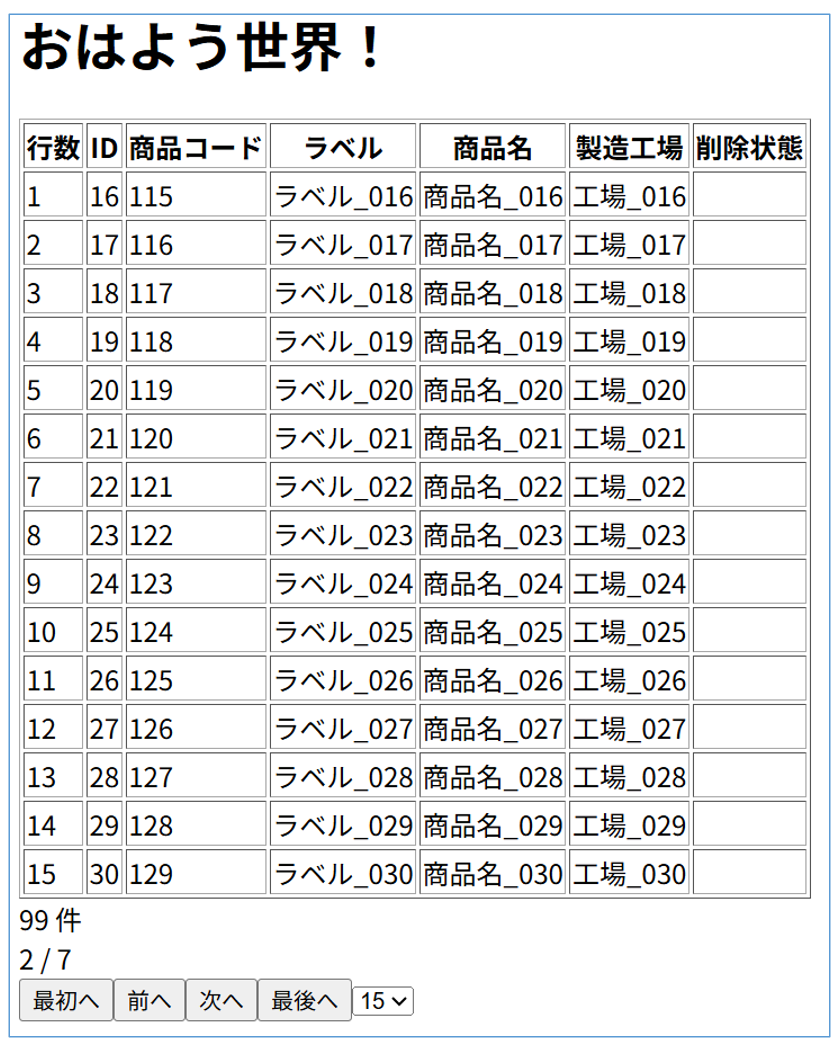 どうでしょうか。
上記設定でキャプチャの様なページング機能を持った『一覧表』が表示されたと思います。
この一覧表は前回の『なんちゃってページング』とは違い、表示分しかデータを読み込んでいません。 色々ボタンをポチポチして挙動を確認してみて下さい。
コントロールバーのデザイン
独自でUIを作成する際に、ある意味一番苦労して妥協するのが『デザイン』です。
しかし今は頼もしい相棒(AI)がいます! 今回は『無料版 Gemini』に相談し8割程度(ほぼ全部)作って貰ったので、それを紹介します。
/* コントルールバー全体 */
.pagination-container {
margin: 0 auto;
padding: 3px 16px;
display: flex;
align-items: center;
justify-content: center;
gap: 8px;
/* 少し濃いめの金属反射グラデーション */
background-image: linear-gradient(
to bottom,
#e2e8f0 0%,
#cbd5e1 20%,
#94a3b8 50%,
#808ea3 52%,
#94a3b8 80%,
#cbd5e1 100%
);
border: 1px solid #475569;
box-shadow:
inset 0 1px 0 rgba(255, 255, 255, 0.4),
inset 0 -1px 0 rgba(0, 0, 0, 0.3),
0 3px 8px rgba(0, 0, 0, 0.2);
font-family: -apple-system, BlinkMacSystemFont, "Segoe UI", Roboto, sans-serif;
color: #f8fafc;
text-shadow: 0 1px 2px rgba(0, 0, 0, 0.5);
box-sizing:border-box;
}
/* ボタン類 */
.btn-page {
display: inline-flex;
align-items: center;
justify-content: center;
height: 28px;
padding: 0 10px;
font-size: 12px;
font-weight: 600;
color: #f8fafc;
background-image: linear-gradient(to bottom, #94a3b8 0%, #64748b 50%, #475569 100%);
border: 1px solid #475569;
border-radius: 5px;
cursor: pointer;
box-shadow: inset 0 1px 0 rgba(255, 255, 255, 0.3), 0 1px 2px rgba(0, 0, 0, 0.2);
transition: all 0.15s ease;
}
/* ホバー時 */
.btn-page:hover:not(:disabled):not([disabled]) {
background-image: linear-gradient(to bottom, #cbd5e1 0%, #94a3b8 50%, #64748b 100%);
color: #ffffff;
border-color: #64748b;
box-shadow: inset 0 1px 0 rgba(255, 255, 255, 0.5), 0 0 5px rgba(255, 255, 255, 0.3);
}
.btn-page:active:not(:disabled):not([disabled]) {
transform: translateY(1px);
background-image: linear-gradient(to bottom, #475569 0%, #64748b 100%);
}
/* 非活性(disabled)ボタン */
.btn-page:disabled,
.btn-page[disabled] {
color: #94a3b8;
background: #475569;
border-color: #334155;
box-shadow: none;
cursor: not-allowed;
opacity: 0.6;
}
/* ページ表示 */
.page-status {
display: flex;
align-items: center;
justify-content: center;
margin-left: 8px;
gap: 6px;
border: 1px solid #666666;
border-radius: 5px;
height: 28px;
padding: 0 10px;
box-sizing: border-box;
/* 背景色と内側の影 */
background-color: rgba(255, 255, 255, 0.5);
}
.page-current {
color: #000000;
text-shadow: 0 0 4px rgba(96, 165, 250, 0.4);
font-size: 16px;
font-weight: 600;
}
/* セレクトボックス */
.select-pagesize {
height: 28px;
padding: 0 6px 0 8px;
margin-left: 2px;
margin-right: 8px;
font-size: 14px;
color: #f8fafc;
background-color: #64748b;
border: 1px solid #475569;
border-radius: 5px;
cursor: pointer;
outline: none;
}
/* トータル件数表示 */
.total-count {
margin-left: 8px;
padding-left: 12px;
font-size: 18px;
color: #222222;
font-style: italic;
}
.count-num {
font-weight: 700;
color: #000000;
}
まぁ大体何をしてるかは理解できますが、興味がある方は解析してみて下さい。 それでは『CSS』をビュー側に適用していきます。
また、ついでに一覧表も綺麗にしてみます。
<!DOCTYPE html>
<html xmlns="http://www.w3.org/1999/xhtml"
xmlns:h="jakarta.faces.html"
xmlns:f="jakarta.faces.core"
xmlns:p="jakarta.faces.passthrough">
<f:metadata>
<f:event type="preRenderView" listener="#{sampleBean.init}" />
</f:metadata>
<h:head id="indexHead">
<title>PageSample</title>
<h:outputStylesheet library="css" name="pagination.css" />
<style>
.dTable-50 {
width:50px;
}
.dTable-100 {
width:100px;
}
.dTable-150 {
width:150px;
}
.dTable-200 {
width:200px;
}
/* 奇数行の背景色 */
.custom-table .row-odd {
background-color: #ffffff;
}
/* 偶数行の背景色(ほんのりグレー) */
.custom-table .row-even {
background-color: #f1f5f9;
}
/* テーブル全体の枠線と結合設定 */
.custom-table {
width: 100%;
border-collapse: collapse; /* 二重線を防ぐ */
border: 1px solid #475569; /* テーブル外枠の線 */
}
/* ヘッダーセル(th)とデータセル(td)の枠線 */
.custom-table th,
.custom-table td {
border: 1px solid #475569; /* セル同士の境界線 */
padding: 6px 10px; /* 余白(読みやすさの調整) */
}
/* ヘッダーの背景色(お好みで調整) */
.custom-table th {
background-color: #334155;
color: #ffffff;
}
</style>
</h:head>
<h:body>
<h1>ページング</h1>
<h:form id="pageForm" prependId="false">
<div style="width:850px;">
<div>
<!--# データテーブル -->
<h:dataTable id="myPaginator" value="#{sampleBean.paginator.getItems()}"
var="product" binding="#{myTable}" styleClass="custom-table" rowClasses="row-odd, row-even">
<h:column headerClass="dTable-50">
<f:facet name="header">行数</f:facet>
#{myTable.rowIndex + 1}
</h:column>
<h:column headerClass="dTable-50">
<f:facet name="header">ID</f:facet>
#{product.id}
</h:column>
<h:column headerClass="dTable-150">
<f:facet name="header">商品コード</f:facet>
#{product.productCode}
</h:column>
<h:column headerClass="dTable-150">
<f:facet name="header">ラベル</f:facet>
#{product.productLabel}
</h:column>
<h:column headerClass="dTable-200">
<f:facet name="header">商品名</f:facet>
#{product.productName}
</h:column>
<h:column headerClass="dTable-150">
<f:facet name="header">製造工場</f:facet>
#{product.factory}
</h:column>
<h:column headerClass="dTable-100">
<f:facet name="header">削除状態</f:facet>
#{product.delFlg}
</h:column>
</h:dataTable>
</div>
<div>
<!--# コントロールバー -->
<div class="pagination-container" style="width:850px;">
<!--# 最初へ -->
<div>
<h:commandButton id="page_first" value="« 最初へ" actionListener="#{sampleBean.paginator.first()}" disabled="#{!sampleBean.paginator.isHasPrev()}" styleClass="btn-page">
<f:ajax execute="@form" render="@form" />
</h:commandButton>
</div>
<!--# 前へ -->
<div>
<h:commandButton id="page_prev" value="‹ 前へ" actionListener="#{sampleBean.paginator.prev()}" disabled="#{!sampleBean.paginator.isHasPrev()}" styleClass="btn-page">
<f:ajax execute="@form" render="@form" />
</h:commandButton>
</div>
<!--# ページ表示 -->
<div class="page-status">
<span class="page-current"><h:outputText id="pageNow" value="#{sampleBean.paginator.getCurrentPage()}" /></span>
<span class="page-current">/</span>
<span class="page-current"><h:outputText id="pageTotal" value="#{sampleBean.paginator.getTotalPages()}" /></span>
</div>
<!--# ページサイズコンボ -->
<div class="select-wrapper">
<h:selectOneMenu id="pageSize" value="#{sampleBean.paginator.localPageSize}" styleClass="select-pagesize">
<f:ajax execute="@form" render="@form" listener="#{sampleBean.paginator.changePageSizeLocal()}" />
<f:selectItem itemValue="10" itemLabel="10件表示" />
<f:selectItem itemValue="15" itemLabel="15件表示" />
<f:selectItem itemValue="30" itemLabel="30件表示" />
</h:selectOneMenu>
</div>
<!--# 次へ -->
<div>
<h:commandButton id="page_next" value="次へ ›" actionListener="#{sampleBean.paginator.next()}" disabled="#{!sampleBean.paginator.isHasNext()}" styleClass="btn-page">
<f:ajax execute="@form" render="@form" />
</h:commandButton>
</div>
<!--# 最後へ -->
<div>
<h:commandButton id="page_last" value="最後へ »" actionListener="#{sampleBean.paginator.last()}" disabled="#{!sampleBean.paginator.isHasNext()}" styleClass="btn-page">
<f:ajax execute="@form" render="@form" />
</h:commandButton>
</div>
<!--# トータル件数 -->
<div class="total-count">
Total: <span class="count-num"><h:outputText id="recordTotal" value="#{sampleBean.paginator.getTotalCount()}" /></span> 件
</div>
</div>
</div>
</div>
</h:form>
</h:body>
</html>
CSSファイルを個別に作成したのに、ビュー側にも『style群』があります。
これは『dataTable』に対するスタイルとなります。
『pagination.css』は、名前の通りページングバーのみのスタイルとなります。 どうでしょう。
ちょっと『イケてる』と思いませんか?
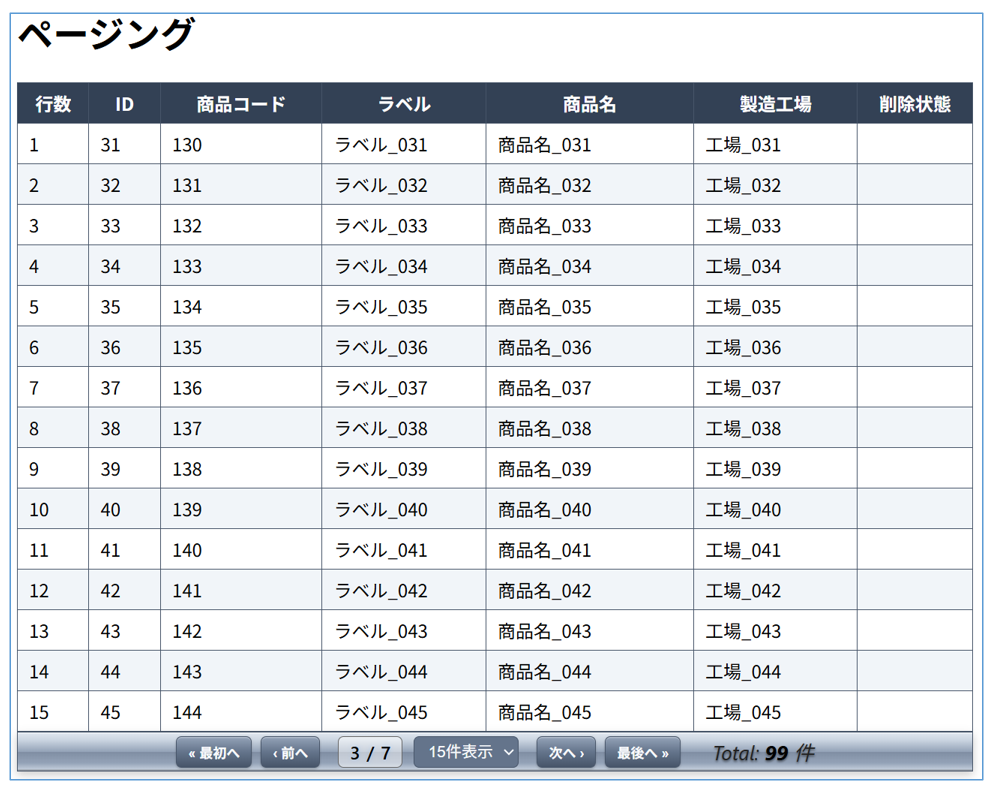
ついでに、レコードを『奇数』『偶数』で色分けしています。
これは『rowClasses』属性によるもので、2つのクラスを設定します。
ページングバーを独立したビューに切り離す
そのため複数の画面で『dataTable』が使われ、ほぼセットでページングバーも必要となります。 またもっと言うと、一覧表示が縦長な場合は、ページングバーを表の上下に配置したいです。
先ほどのサンプルでもお分かりの通り、ページングバーのコードは《50行》程度必要とします。
このコードを表の上下に記述するのは視認性が落ちますし、メンテナンス性もよろしくありません。 同じものなら『共通部品にしたい』と思いますよね。 これを実現するのが『ページングバーを独立したビューに切り離す』です。
切り離した事でビューからは『ページングバー.xhtml』をインクルードするだけで完了します。 この仕組みなら『視認性』『メンテナンス性』共に優れていますよね。 では早速ページングバーを単独の『pagination.xhtml』に切り出しましょう。
<?xml version="1.0" encoding="UTF-8"?>
<!DOCTYPE html>
<html xmlns="http://www.w3.org/1999/xhtml"
xmlns:h="jakarta.faces.html"
xmlns:f="jakarta.faces.core"
xmlns:ui="jakarta.faces.facelets"
xmlns:p="jakarta.faces.passthrough">
<body>
<ui:composition>
<h:outputStylesheet library="css" name="pagination.css" />
<!--# コントロールバー -->
<div class="pagination-container" style="#{paginator_width}">
<!--# 最初へ -->
<div>
<h:commandButton id="page_first" value="« 最初へ" actionListener="#{paginator.first()}" disabled="#{!paginator.isHasPrev()}" styleClass="btn-page">
<f:ajax execute="@form" render="@form" />
</h:commandButton>
</div>
<!--# 前へ -->
<div>
<h:commandButton id="page_prev" value="‹ 前へ" actionListener="#{paginator.prev()}" disabled="#{!paginator.isHasPrev()}" styleClass="btn-page">
<f:ajax execute="@form" render="@form" />
</h:commandButton>
</div>
<!--# ページ表示 -->
<div class="page-status">
<span class="page-current"><h:outputText id="pageNow" value="#{paginator.getCurrentPage()}" /></span>
<span class="page-current">/</span>
<span class="page-current"><h:outputText id="pageTotal" value="#{paginator.getTotalPages()}" /></span>
</div>
<!--# ページサイズコンボ -->
<div class="select-wrapper">
<h:selectOneMenu id="pageSize" value="#{paginator.localPageSize}" styleClass="select-pagesize">
<f:ajax execute="@this" render="@form" listener="#{paginator.changePageSizeLocal()}" />
<f:selectItem itemValue="10" itemLabel="10件表示" />
<f:selectItem itemValue="15" itemLabel="15件表示" />
<f:selectItem itemValue="30" itemLabel="30件表示" />
</h:selectOneMenu>
</div>
<!--# 次へ -->
<div>
<h:commandButton id="page_next" value="次へ ›" actionListener="#{paginator.next()}" disabled="#{!paginator.isHasNext()}" styleClass="btn-page">
<f:ajax execute="@form" render="@form" />
</h:commandButton>
</div>
<!--# 最後へ -->
<div>
<h:commandButton id="page_last" value="最後へ »" actionListener="#{paginator.last()}" disabled="#{!paginator.isHasNext()}" styleClass="btn-page">
<f:ajax execute="@form" render="@form" />
</h:commandButton>
</div>
<!--# トータル件数 -->
<div class="total-count">
Total: <span class="count-num"><h:outputText id="recordTotal" value="#{paginator.getTotalCount()}" /></span> 件
</div>
</div>
</ui:composition>
</body>
</html>
・ページングバー用スタイルシート『pagination.css』は、こちらのファイルでリンクを貼ります。
・ページングバーの共通化にあたり、どうしても個別に設定する必要がある項目があります。
『ページングバーの長さ(ピクセル)』
・#{paginator} ページングバーが扱うデータインスタンスを設定
<!DOCTYPE html>
<html xmlns="http://www.w3.org/1999/xhtml"
xmlns:h="jakarta.faces.html"
xmlns:f="jakarta.faces.core"
xmlns:ui="jakarta.faces.facelets"
xmlns:p="jakarta.faces.passthrough">
<f:metadata>
<f:event type="preRenderView" listener="#{sampleBean.init}" />
</f:metadata>
<h:head id="indexHead">
<title>PageSample</title>
<style>
.table-title {
font-weight: bold;
text-align: center;
border: 1px solid #999;
color:#fff;
background-color:midnightblue;
}
.dTable-50 {
width:50px;
}
.dTable-100 {
width:100px;
}
.dTable-150 {
width:150px;
}
.dTable-200 {
width:200px;
}
.dTable-350 {
width:350px;
}
/* 奇数行の背景色 */
.custom-table .row-odd {
background-color: #ffffff;
}
/* 偶数行の背景色(ほんのりグレー) */
.custom-table .row-even {
background-color: #f1f5f9;
}
/* テーブル全体の枠線と結合設定 */
.custom-table {
width: 100%;
border-collapse: collapse; /* 二重線を防ぐ */
border: 1px solid #475569; /* テーブル外枠の線 */
}
/* ヘッダーセル(th)とデータセル(td)の枠線 */
.custom-table th {
border: 1px solid #475569; /* セル同士の境界線 */
padding: 0;
}
.custom-table td {
border: 1px solid #475569; /* セル同士の境界線 */
padding: 0 0 0 5px;
}
.div-cell-1 {
margin-left: -5px;
padding: 0 0 0 5px;
border-bottom: 1px solid #475569;
border-top: none;
}
.div-cell-2 {
margin-left: -5px;
padding: 0 0 0 5px;
}
</style>
</h:head>
<h:body>
<h1>ページング</h1>
<h:form id="pageForm" prependId="false">
<div style="width:850px;">
<div style="display: flex;">
<div class="dTable-50 table-title" style="display:flex;align-items:center;justify-content:center;">連番</div>
<div>
<div class="dTable-100 table-title">ID</div>
<div class="dTable-100 table-title">コード</div>
</div>
<div class="dTable-150 table-title" style="display:flex;align-items:center;justify-content:center;">ラベル</div>
<div class="dTable-350 table-title" style="display:flex;align-items:center;justify-content:center;">商品名</div>
<div class="dTable-150 table-title" style="display:flex;align-items:center;justify-content:center;">工場</div>
<div class="dTable-50 table-title" style="display:flex;align-items:center;justify-content:center;">削除</div>
</div>
<div>
<!--# ページングバー -->
<f:subview id="sub1">
<ui:include src="common/pagination.xhtml">
<ui:param name="paginator" value="#{sampleBean.paginator}" />
<ui:param name="paginator_width" value="width:850px;" />
</ui:include>
</f:subview>
</div>
<div>
<!--# データテーブル -->
<h:dataTable id="myPaginator" value="#{sampleBean.paginator.getItems()}"
var="product" binding="#{myTable}" styleClass="custom-table" rowClasses="row-odd, row-even">
<h:column styleClass="dTable-50">
#{myTable.rowIndex + 1}
</h:column>
<h:column styleClass="dTable-100">
<div class="div-cell-1">#{product.id}</div>
<div class="div-cell-2">#{product.productCode}</div>
</h:column>
<h:column styleClass="dTable-150">
#{product.productLabel}
</h:column>
<h:column styleClass="dTable-350">
#{product.productName}
</h:column>
<h:column styleClass="dTable-150">
#{product.factory}
</h:column>
<h:column styleClass="dTable-50">
#{product.delFlg}
</h:column>
</h:dataTable>
</div>
<div>
<!--# ページングバー -->
<f:subview id="sub2">
<ui:include src="common/pagination.xhtml">
<ui:param name="paginator" value="#{sampleBean.paginator}" />
<ui:param name="paginator_width" value="width:850px;" />
</ui:include>
</f:subview>
</div>
</div>
</h:form>
</h:body>
</html>
呼び出し先にパラメータを渡したい場合は『param』タグで指定します。
ここでは前述した様に、以下2つのパラメータを渡しています。
※「pageSampleBean.paginator」とする事で、特定のバッキングビーンに縛られずに呼び出し先で処理できます ・ページングバーの幅
※「width:850px;」と、スタイルの書式で指定する
『include』タグをラップしている『subview』タグに注目して下さい。
各種タグの『ID属性名』はユニークでなければいけません。
Jakartaは厳密にチェックするため、重複したIDがあるとエラーとなります。
この問題を良きに計らってくれるのが『subview』タグとなります。 ここで任意の値を指定すると、インクルード先の『ID属性名』に指定した値のプレディックスが付与されます。
要するに重複したIDになりません。
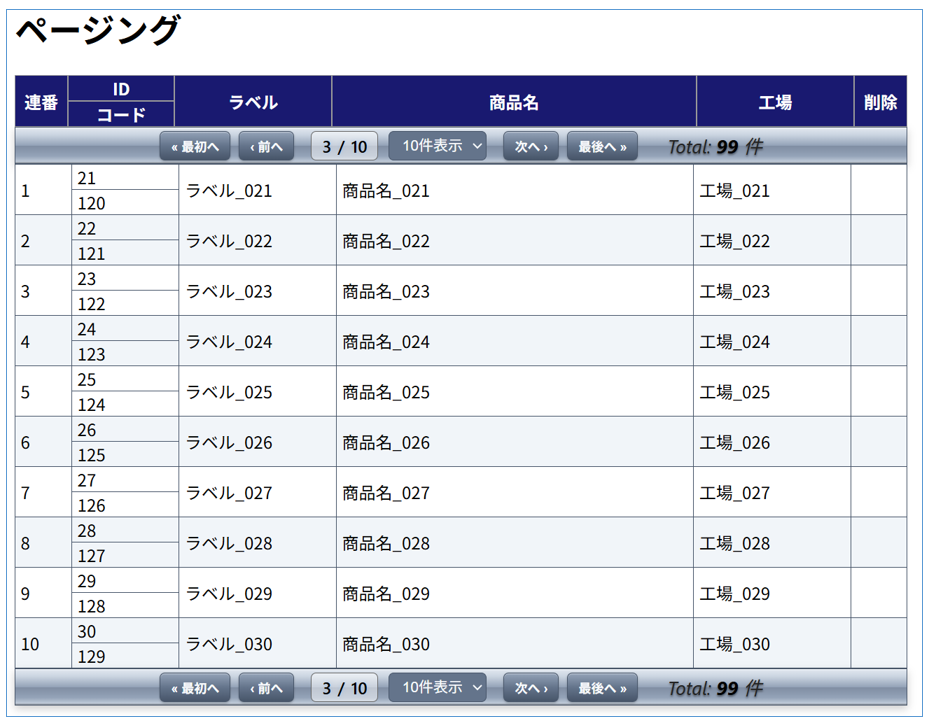 ページングバーを表の上下に設置したサンプルとなります。
表の内容も同じでは芸が無いので、一部多段表示にしてみました。 『PrimeFaces』を利用する場合は『p:row』タグが使えましたが、今回は使えません。
従って、力業で多段表現を実現しています。 汚いコードですが参考になれば幸いです。



insert into products (product_code, product_label, product_name, factory, del_flg) values
('100','ラベル_001','商品名_001','工場_001',' ')
,('101','ラベル_002','商品名_002','工場_002',' ')
,('102','ラベル_003','商品名_003','工場_003',' ')
,('103','ラベル_004','商品名_004','工場_004',' ')
,('104','ラベル_005','商品名_005','工場_005',' ')
,('105','ラベル_006','商品名_006','工場_006',' ')
,('106','ラベル_007','商品名_007','工場_007',' ')
,('107','ラベル_008','商品名_008','工場_008',' ')
,('108','ラベル_009','商品名_009','工場_009',' ')
,('109','ラベル_010','商品名_010','工場_010',' ')
,('110','ラベル_011','商品名_011','工場_011',' ')
,('111','ラベル_012','商品名_012','工場_012',' ')
,('112','ラベル_013','商品名_013','工場_013',' ')
,('113','ラベル_014','商品名_014','工場_014',' ')
,('114','ラベル_015','商品名_015','工場_015',' ')
,('115','ラベル_016','商品名_016','工場_016',' ')
,('116','ラベル_017','商品名_017','工場_017',' ')
,('117','ラベル_018','商品名_018','工場_018',' ')
,('118','ラベル_019','商品名_019','工場_019',' ')
,('119','ラベル_020','商品名_020','工場_020',' ')
,('120','ラベル_021','商品名_021','工場_021',' ')
,('121','ラベル_022','商品名_022','工場_022',' ')
,('122','ラベル_023','商品名_023','工場_023',' ')
,('123','ラベル_024','商品名_024','工場_024',' ')
,('124','ラベル_025','商品名_025','工場_025',' ')
,('125','ラベル_026','商品名_026','工場_026',' ')
,('126','ラベル_027','商品名_027','工場_027',' ')
,('127','ラベル_028','商品名_028','工場_028',' ')
,('128','ラベル_029','商品名_029','工場_029',' ')
,('129','ラベル_030','商品名_030','工場_030',' ')
,('130','ラベル_031','商品名_031','工場_031',' ')
,('131','ラベル_032','商品名_032','工場_032',' ')
,('132','ラベル_033','商品名_033','工場_033',' ')
,('133','ラベル_034','商品名_034','工場_034',' ')
,('134','ラベル_035','商品名_035','工場_035',' ')
,('135','ラベル_036','商品名_036','工場_036',' ')
,('136','ラベル_037','商品名_037','工場_037',' ')
,('137','ラベル_038','商品名_038','工場_038',' ')
,('138','ラベル_039','商品名_039','工場_039',' ')
,('139','ラベル_040','商品名_040','工場_040',' ')
,('140','ラベル_041','商品名_041','工場_041',' ')
,('141','ラベル_042','商品名_042','工場_042',' ')
,('142','ラベル_043','商品名_043','工場_043',' ')
,('143','ラベル_044','商品名_044','工場_044',' ')
,('144','ラベル_045','商品名_045','工場_045',' ')
,('145','ラベル_046','商品名_046','工場_046',' ')
,('146','ラベル_047','商品名_047','工場_047',' ')
,('147','ラベル_048','商品名_048','工場_048',' ')
,('148','ラベル_049','商品名_049','工場_049',' ')
,('149','ラベル_050','商品名_050','工場_050',' ')
,('150','ラベル_051','商品名_051','工場_051',' ')
,('151','ラベル_052','商品名_052','工場_052',' ')
,('152','ラベル_053','商品名_053','工場_053',' ')
,('153','ラベル_054','商品名_054','工場_054',' ')
,('154','ラベル_055','商品名_055','工場_055',' ')
,('155','ラベル_056','商品名_056','工場_056',' ')
,('156','ラベル_057','商品名_057','工場_057',' ')
,('157','ラベル_058','商品名_058','工場_058',' ')
,('158','ラベル_059','商品名_059','工場_059',' ')
,('159','ラベル_060','商品名_060','工場_060',' ')
,('160','ラベル_061','商品名_061','工場_061',' ')
,('161','ラベル_062','商品名_062','工場_062',' ')
,('162','ラベル_063','商品名_063','工場_063',' ')
,('163','ラベル_064','商品名_064','工場_064',' ')
,('164','ラベル_065','商品名_065','工場_065',' ')
,('165','ラベル_066','商品名_066','工場_066',' ')
,('166','ラベル_067','商品名_067','工場_067',' ')
,('167','ラベル_068','商品名_068','工場_068',' ')
,('168','ラベル_069','商品名_069','工場_069',' ')
,('169','ラベル_070','商品名_070','工場_070',' ')
,('170','ラベル_071','商品名_071','工場_071',' ')
,('171','ラベル_072','商品名_072','工場_072',' ')
,('172','ラベル_073','商品名_073','工場_073',' ')
,('173','ラベル_074','商品名_074','工場_074',' ')
,('174','ラベル_075','商品名_075','工場_075',' ')
,('175','ラベル_076','商品名_076','工場_076',' ')
,('176','ラベル_077','商品名_077','工場_077',' ')
,('177','ラベル_078','商品名_078','工場_078',' ')
,('178','ラベル_079','商品名_079','工場_079',' ')
,('179','ラベル_080','商品名_080','工場_080',' ')
,('180','ラベル_081','商品名_081','工場_081',' ')
,('181','ラベル_082','商品名_082','工場_082',' ')
,('182','ラベル_083','商品名_083','工場_083','1')
,('183','ラベル_084','商品名_084','工場_084',' ')
,('184','ラベル_085','商品名_085','工場_085',' ')
,('185','ラベル_086','商品名_086','工場_086',' ')
,('186','ラベル_087','商品名_087','工場_087',' ')
,('187','ラベル_088','商品名_088','工場_088',' ')
,('188','ラベル_089','商品名_089','工場_089',' ')
,('189','ラベル_090','商品名_090','工場_090',' ')
,('190','ラベル_091','商品名_091','工場_091',' ')
,('191','ラベル_092','商品名_092','工場_092',' ')
,('192','ラベル_093','商品名_093','工場_093',' ')
,('193','ラベル_094','商品名_094','工場_094',' ')
,('194','ラベル_095','商品名_095','工場_095',' ')
,('195','ラベル_096','商品名_096','工場_096',' ')
,('196','ラベル_097','商品名_097','工場_097',' ')
,('197','ラベル_098','商品名_098','工場_098',' ')
,('198','ラベル_099','商品名_099','工場_099',' ')
,('199','ラベル_100','商品名_100','工場_100',' ');